
Admin

Staff member
Laptop Repair Team
Joined
Nov 2, 2017
Messages
8,979
Likes
1,140
Points
4,577
Age
41
Location
Tbilisi
Website
alexlaptoprepair.com
#1
Vertyanov Successor Programmer for
SPI FLASH
memory
EC support new gen laptops
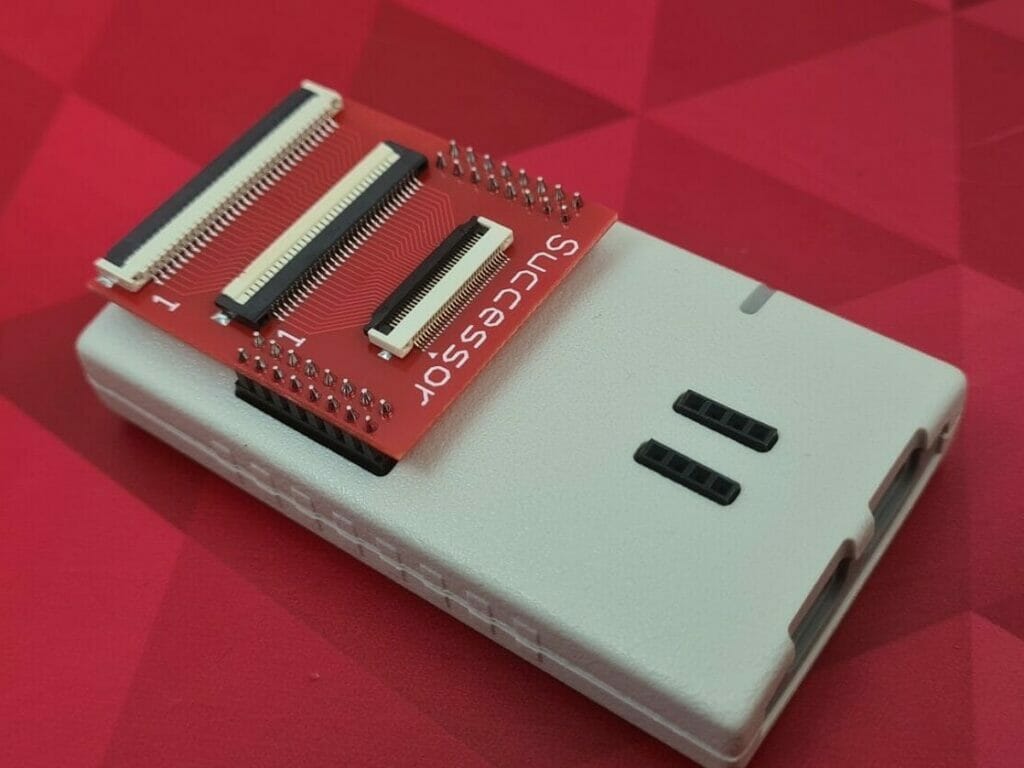

Vertyanov SUCCESSOR - programmer for SPI FLASH memory and EC

support all embedded EC ENE/ITE/MEC/NUVOTON/EXPLORE.
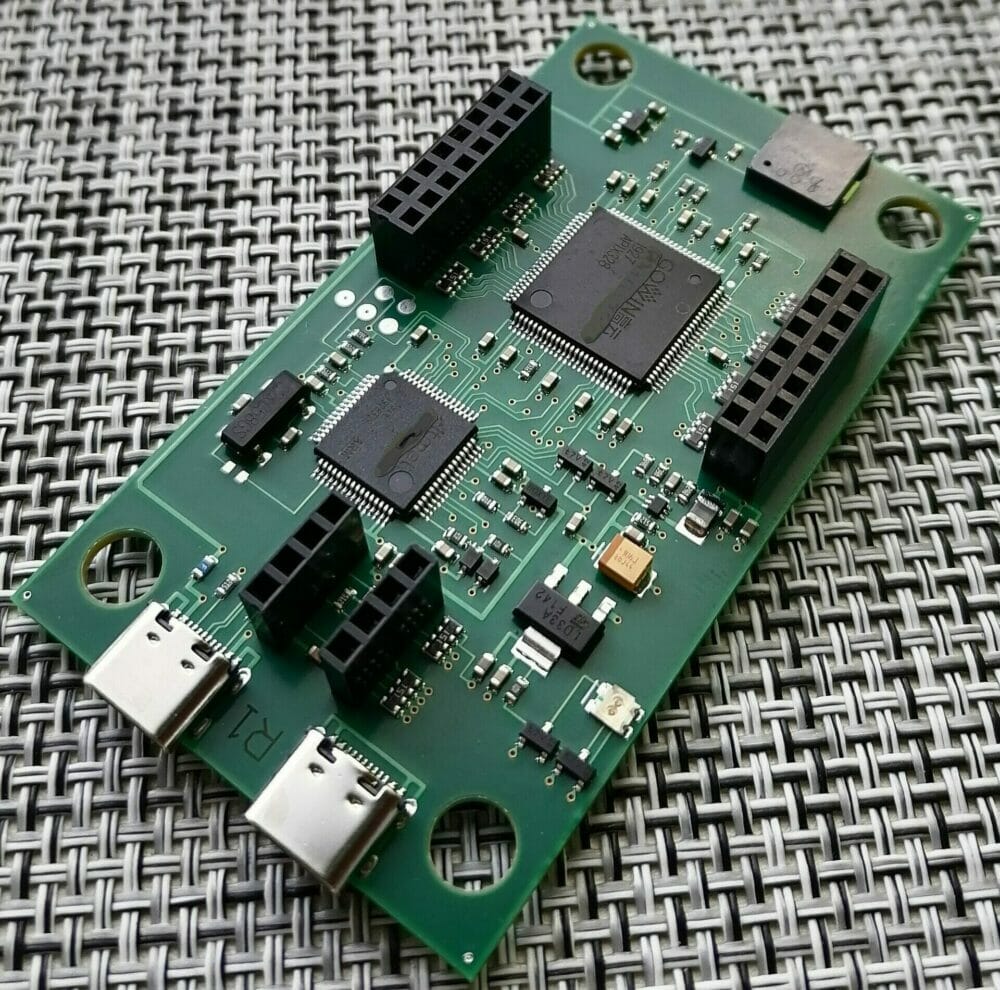


Output control signal levels 1v8 and 3v3. ESD protection is already installed.
Created on the basis 32-bit ARM® Cortex®-M4 RISC processor 120 MHz USB_FS and GoWin FPGA

The programmer is available to update the firmware of MCU and FPGA. When functionality is added, an update is released, and all users download and update it for free. No additional payments need to be made.

The SUCCESSOR kit consists of a module in a case (see photo), an adapter with 05/08/1mm connectors (as on the 3rd version of the Vertyanov_JIG programmer) and a basic set of 05mm(30/32pin)/08mm(26/30)/1mm(24/ 26/28/30/32)

IMPORTANT!! Socket for SPI FLASH and USB cables (2 pieces TYPE_C) are not included in the package!
As in the case of the 3rd version of the programmer, to work with the EC, you will need a second USB cable to connect the GND of the programmer and the MB.

The Vertyanov SUCCESSOR is a programmer for SPI FLASH memory and EC (ENE/ITE/MEC/NUVOTON/EXPLORE) firms. It has a 32-bit ARM Cortex-M4 RISC processor running at 120 MHz and a GoWin FPGA. The output control signal levels are 1v8 and 3v3, and ESD protection is already installed.
One of the key features of the SUCCESSOR is that it allows for updating the firmware of both the MCU and FPGA. When new functionality is added, an update is released and all users can download and update it for free, without any additional payments.

The SUCCESSOR kit includes a module in a case, an adapter with 05/08/1mm connectors (similar to the 3rd version of the Vertyanov JIG programmer), and a basic set of 05mm(30/32pin)/08mm(26/30)/1mm(24/ 26/28/30/32) connectors. However, it is important to note that the package does not include the socket for the SPI FLASH and USB cables (2 pieces TYPE_C) which are required for the programmer to work.
Additionally, to work with the EC, a second USB cable is needed to connect the GND of the programmer and the MB. The Vertyanov SUCCESSOR offers a reliable and efficient solution for programming SPI FLASH memory and EC.

Buy Vertyanov Successor From This Link
 
Last edited:

cairo

New Member
Joined
Jan 29, 2018
Messages
3
Likes
1
Points
3
Age
34
#3
hello
can anyone have software for new vertyanov successor i cant find it !!
 

Admin

Staff member
Laptop Repair Team
Joined
Nov 2, 2017
Messages
8,979
Likes
1,140
Points
4,577
Age
41
Location
Tbilisi
Website
alexlaptoprepair.com

Admin

Staff member
Laptop Repair Team
Joined
Nov 2, 2017
Messages
8,979
Likes
1,140
Points
4,577
Age
41
Location
Tbilisi
Website
alexlaptoprepair.com

Laptop repair Latest videos

Latest threads

CYPD PD IC ADAPTER FOR TYPE-C CONTROLLER

CYPD OFFLINE ADAPTER FOR Cypress TYPE-C CONTROLLER Firmware PROGRAMMING SUPPORT SVOD,PSOC MiniProg,CY8CKIT SWD


CYPD3196,CYPD5126,CYPD4236,CYPD4126,CYPD4225,CYPD4226,CYPD4125,CYPD4136,CYPD4226,CYPD5125,CYPD5137,CYPD4225,CYPD1122,CYPD1134,CYPD1120,CYPD4126,CYPD6128,CYPD6127,CYPD5225,CYPD8229,CYPD2122,CCG8,CYPD3125,CYPD4236,CYPD5235CYPD5236,CYPDCYPD6227,CYPD6228
LINK

HDMI Real-Time Line Tracer Tester – Advanced Diagnostic Tool for GPU Cards, Game Consoles & Laptop Repair

This compact HDMI tester plugs directly into the HDMI port to probe every signal line using the internal ESD protection diodes of the connected GPU CHIP , HDMI encoder, retimer, level shifter


This compact HDMI tester plugs directly into the HDMI port to probe every signal line using the internal ESD protection diodes of the connected HDMI encoder, retimer, level shifter, or GPU CHIP Depends on the device .
It allows you to directly verify HDMI port connectivity and confirm that all TMDS, clock, DDC, CEC, By observing line response through the ESD paths, you can quickly detect open lines, shorts, or missing connections without powering the board.


Key Capabilities
Tests all HDMI signal lines via IC ESD paths
Confirms HDMI socket ↔ chip connectivity
Detects broken, shorted, or floating lines
Breakout for all pins
No firmware, no power-up required ( only CR2032 BATTERY )


LINK OF THE HDMI TESTER

RTS545X Type-C Controller Firmware Adapter – All-in-One Solution with Multi-Programmer Support

The RTS545X Type-C controller chip is used for reading and writing firmware to resolve certain issues in Type-C circuits in new Generation of laptop,PC,Monitos,Aio,Powerbank .support multi headers Compatible with SUCCESSOR, SVOD, and UNIVERSAL Programmers
adapter, bios adapter, RT5S5450, RTS5430, RTS5432, RTS5432M, RTS5439, RTS5439H, RTS5439V, RTS5440, RTS5445, RTS5450, RTS5450M, RTS5452, RTS5452H, RTS5453, RTS5453H, RTS5455, RTS5457, RTS5457T, RTS5457U, RTS5457V, RTS5458, RTS5458H, RTS545X, SUCCESSOR, SVOD, SVOD4, VERTYANOV

ALL IN ONE FOR QFN46,QFN32,QFN40,QFN24,QFN52,QFN68 ( LATEST)

ONE PACKAGE FOR THE QFN46 (COMMON ONE)


The RTS545X Type-C chip offline Adapter is used for reading and writing firmware to fix certain issues in Type-C circuits for power and display in Laptop , PC , Monitors , Consols .support RTS5430, RTS5432, RTS5432M, RTS5440, RTS5445, RTS5450, RTS5450M, RTS5455, RTS545X, etc with multi headers Compatible with SUCCESSOR, Vertyanov , SVOD, and UNIVERSAL Programmers and support Pads in order you need to use it in specific wiring or testing the chip with CRO
READING AND WRITING FIRMWARE ON RTS545X
WRITING FIRMWARE ON RTS545X

READING & WRITING THE FIRMWARE USING SUCCESSOR50 PROGRAMMER


READING & WRITING THE FIRMWARE USING SVOD4


link of the adapter

I need a boardview and schematics for 820-01949 please

I need a boardview and schematics for 820-01949 please

Dell Latitude 3310 19717-1 CYPD5126-40LQXIT U7201 type-c controller firmware

Dell Latitude 3310 19717-1
CYPD5126-40LQXIT
U7201
Type-c controller firmware

Lenovo Thinkpad daoli5mb6io

Hi everyone, i need this schematic: Lenovo Thinkpad daoli5mb6io
thanks.

DELL 7010 9010

БИОС DELL 7010 9010

HP Pro 3500

BIOS HP Pro 3500

CYPD OFFLINE ADAPTER FOR TYPE-C CONTROLLER PROGRAMMING SUPPORT SVOD,PSOC MiniProg SWD JTAG

CYPD OFFLINE ADAPTER FOR TYPE-C CONTROLLER PROGRAMMING SUPPORT SVOD,PSOC MiniProg SWD JTAG
SUPPORT ALL TYPE-C CONTROLLER
CYPD5126,CYPD4126,CYPD4125,CYPD4226,
CYPD5137,CYPD4225,CYPD6228,CYPD4136,
CYPD6128,CYPD6127,CYPD6227,CYPD4126,
CYPD5225,CYPD4236


Link for the cypd adapter

Dell vostro 15

15341-1 dell laptop schematics & board viwe

Lenovo G50-30 ACLU9 ACLU0 NM-A311 REV 1.0 BoardView File.TVW

Hello, I need Boardview on Lenovo G50-30 ACLU9/ACLU0 NM-A311 REV 1.0 BoardView File.TVW
Thanks

PMBUS PROGRAMMER [IOR] IR DUAL MODE ONLINE/OFFILINE SUPPORT OFFLINE ADAPTER For Graphics Cards,pc motherboard,laptop GPU Infineon


  • PMBUS IOR/IR/XDP/CHL/ASP PROGRAMMER
    Features:
    Support Online/Offline mode
    ( connect to motherboard directly , or in some cases we need to solder the ic on the offiline adapter )
    All Requirements Support
    3V,1.8V,SCL,SDA
    EN/PE,IREF,IREF2,PGOOD,SALRT
    ESD Protections , Indicators
    Read & Write program
    Monitor functions online and offline
    Change parameters
    Support backup one chip or all systems ( multi chip together )
    PMBUS PROGRAMMER CHIP SUPPORT LIST:
    • SUPPORT
      IR35201,IR35203,IR35204,IR35217,IRPS5401,IR38263
      IR38265,IR38163,IR38164,IR38363,IR38165,IR38365
      IR38060,IR38062,IR.8063,IR38064,IR3590,IR3595
      IR3588,IR3596,IR36021,IR3563B,IR3564B,IR3565B
      IR3567B,IR3570B,IR3585B,IR35211,IR35218,IR3580
      IR3581,IR3584,IR3591,XDPE11280A,IR35207,IR35209
      IR25210,IR35212,IR35215 , MORE
      OFFLINE ADAPTER IR35201,IR3580,XDPE132G5D,IR3595,IR3567,ASP1300,IR3563,IR35217,IR3570,CHL8228,ASP1251,CHL8325,IR3541,IR3564,IR35204
    IOR READ,WRITE & Modify REGISTER Program :


  • According to the schematic, pin 24 is SDA and pin 25 is SCL in the PMBus section.
    Solder SDA, SCL, and GND, then connect the programmer to your computer and power on the device.
    If you’re using an offline adapter, first solder the chip, then connect the adapter to the programmer before connecting the programmer to your computer.
    Software Setup
    Open IR PowIRCenter or XDPDesigner, depending on the chip type.

    When the programmer connects successfully, the status indicator in the lower-left corner will turn green.
    Click the Auto Populate Devices icon (first icon on the left).
    All connected chips will be displayed under Total Pout (e.g., IR35217, IR3580 if both are connected).
    Select the desired chip from the list to display its register map, where you can view and modify parameters.
    Backing Up the Program
    To back up the current program, click Save Config File.
    If a user password prompt appears, simply ignore it and click Continue.
    The file will be saved in .txt format, which you can use later.
    Alternatively, you can save the entire board data by clicking File > Save Board Design, which generates a PCB data file.
    Writing a Program

    To write a configuration, click Load Config File and select the desired .txt file.
    Then click Write All Reg to program the chip.
    Utilities & Diagnostics
    The software also offers several utilities under the Utilities menu.
    For example, selecting SalemDevice will display a counter showing how many times the chip has been programmed (some chips have a write limit).
    Clicking Check MTP will reveal additional memory/programming details.
    Selecting Device Status will display a phase fault report to help diagnose potential hardware damage.


    LINK OF THE PROGRAMMER : ALEXSOF

A2141 boardview

Anywhere I can get a copy of MacBook A2141 boardview

Dell Latitude 13 3380 16824-1 clear me BIOS OK

Dell Latitude 13 3380
16824-1
clear me BIOS OK

ASUS N752VX V301 CLEAR ME BIOS

ASUS N752VX
V301
CLEAR ME BIOS
Top